
Before you start
- A complete archive, its correct password, and sufficient free storage for the extracted files.
- For .7z.001, .7z.002, and later volumes, download the complete set into one directory without renaming them.
- Give PatchDoc access to that directory. Permission to a single volume may not cover its siblings.
Step by step
Prepare the complete archive
Open a local or fully downloaded archive. For split sets, check that volume numbers are continuous and no parts are missing.
Enter the password
When prompted, enter the archive password and unlock it. Encrypted filenames can require a password before the directory is visible; content encryption may prompt when previewing or extracting.
Inspect the contents
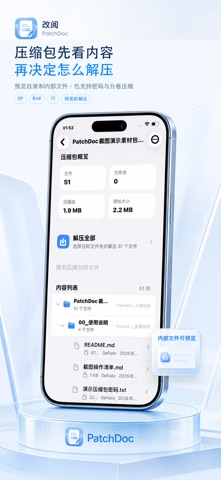
Review the folder structure, file count, and size. Preview supported entries to identify the files you need. Browsing is separate from extracting the full archive into your file space.
Choose the destination
Select Extract All, choose the output folder, and confirm extraction there. Wait for completion; encrypted or large archives can take longer depending on the files and device.
Review the extracted files
Open the result or return to the destination folder. Check a few important files before sharing the output folder.
Check your result
Check the output folder structure, file count, and a few important files before reorganizing the original archive or split volumes.
Scope and limitations
- Obtain the password from the sender. PatchDoc does not recover or crack lost passwords.
- Damaged archives, missing volumes, and unsupported encodings may prevent reading even with the correct password.
- Encryption, split-volume, and preview support differ between archive formats.
Troubleshooting
The password seems correct
Check spaces, case, keyboard input, and download completeness. Ask the sender to test the same archive if needed.
A volume cannot be found
Keep every volume in the same folder with its original name. Grant directory access, such as by mounting the folder; importing .001 alone may not include the other parts.
Extraction stops
Check available storage and destination write permissions. Extracted data can be much larger than the archive; distinguish any partial output before retrying.
Common questions
Are encrypted filenames supported?
PatchDoc can attempt to read and extract header-encrypted 7Z archives with the correct password, subject to completeness and encoding compatibility.
Must I extract everything to preview one file?
No. Supported entries can be previewed individually. Extract them when you need persistent files outside the archive.
Instructions reflect the reviewed feature set. Control placement may vary by version.